Ekkie Dispatching Documentation
Written By Casian
Last updated About 1 month ago
After Labeling runs on a new ticket, Ekkie Dispatching picks the right engineer to assign it to.
How Ekkie picks the right engineer
Ekkie looks at the Queue value Labeling applied to the ticket and pulls every engineer who's a member of that queue.
It filters out anyone who can't reasonably take the ticket right now:
inactive engineers
engineers currently sitting in (or about to walk into) a calendar appointment — the cutoff is your configured Appointment lookahead window
engineers with approved time-off scheduled for tomorrow
From the remaining candidates, Ekkie picks the engineer with the fewest currently-active tickets assigned to them — so workload spreads naturally across the team instead of piling up on one person.
If no one in the labeled queue qualifies (e.g. everyone's in a meeting, the queue is empty, or no engineers are members of it), Ekkie widens the search to all queues so the ticket still lands with someone instead of sitting unassigned.
Dispatching settings page
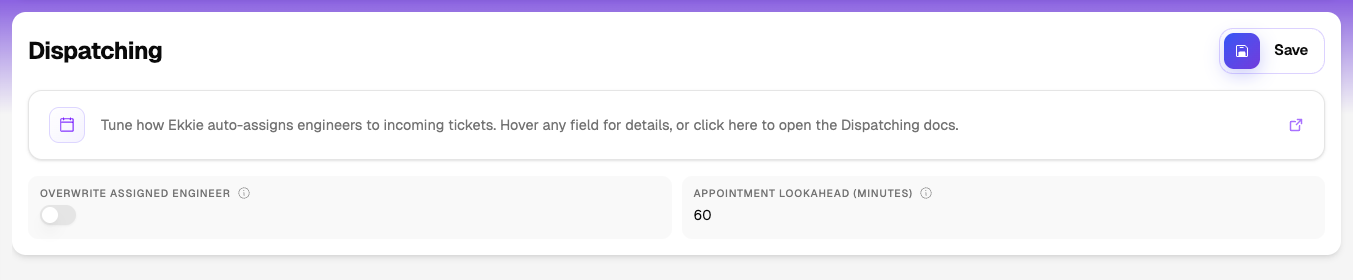
Overwrite assigned engineer — ON means Ekkie replaces engineers your team manually assigned. OFF means Ekkie only fills blanks. Default OFF. Leave OFF until you've watched Ekkie's choices for a few days and trust them.
Appointment lookahead (minutes) — Ekkie skips engineers with a meeting starting inside this window. Higher values give the assigned engineer longer uninterrupted blocks. Lower values spread tickets more aggressively across the team. (Auto-dispatch on/off is managed by Ekkie support and is not exposed in the UI.)
Save — top-right of the island.
Permissions
The Dispatching permission unlocks this page. To start using Ekkie Dispatching ask Ekkie support to turn it on when you're ready to add Dispatching.
Your admin can grant the Dispatching role to other teammates from the Users page.
Potential issues
Credentials not configured on Test Connection — contact Ekkie support.